Purpose of the
Design System
This page defines the FlashID design system to ensure consistency across all user interfaces including the citizen dashboard and administrator portals. This provides consistency with one centralized source of truth.
Logo Specification
Primary

Black variant
Green variant
Gold variant
Colour Palette
Primary Green
#007A4D · rgb(0, 122, 77)
Primary actions.
Deep Green
#053B2C · rgb(5, 59, 44)
hover and active states.
Accent Gold
#FFB81C · rgb(255, 184, 28)
For accents.
National Red
#DE3831 · rgb(222, 56, 49)
Secondary support.
National Blue
#002395 · rgb(0, 35, 149)
Tertiary support.
Clean White
#FFFFFF · rgb(255, 255, 255)
Cards and containers.
Cream Background
#F7F4EA · rgb(247, 244, 234)
App background.
Text Primary
#111827 · rgb(17, 24, 39)
Main body text
Muted Text
#6B7280 · rgb(107, 114, 128)
Captions and labels.
Border Grey
#E5E7EB · rgb(229, 231, 235)
For outlines.
Neutral Mid Grey
#9CA3AF · rgb(156, 163, 175)
Disabled elements.
Success Green
#16A34A · rgb(22, 163, 74)
Success feedback.
Warning Amber
#D97706 · rgb(217, 119, 6)
Warning states.
Danger Red
#DC2626 · rgb(220, 38, 38)
Destructive actions
Typography System
Font Source
Inter - css custom property
Typographic Scale
Display
H1
H2
H3
H4
Body
Caption
Label
Component Library
If the Button or Card components are modified, this section updates automatically.
default
disabled
invalid
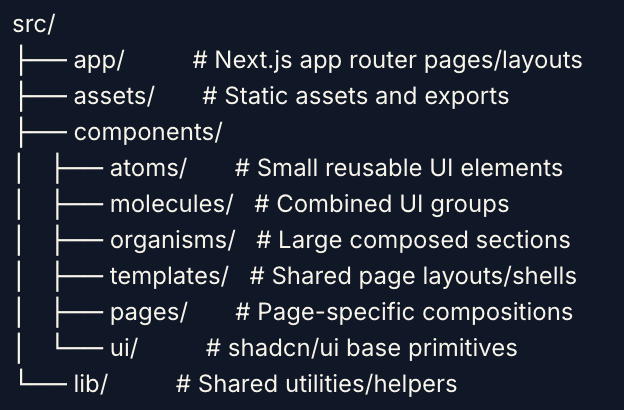
Component Organisation
Iconography
FlashID uses Lucide for modern icon systems paired well with shadcn/ui: import { IconName } from "lucide-react". A few of which are:
Voice & Tone
Clear & Direct
Say what happened and what to do next. No filler.
Reassuring & Secure
Sound calm and in control, especially around identity and security actions.
Plain Language
Avoid technical or legal jargon citizens would not use themselves.
Encouraging, Not Alarming
Errors are framed as fixable, not as failures on the part of the user.
Design Tokens
These tokens are the single source of truth for colour.Codebases must references these, instead of hardcoded values.
Accessibility Standards
Keyboard Navigation
- •Every interactive element is reachable using the Tab key in a logical navigation order
- •Dashboard dialogs and modals trap keyboard focus while open and restore focus to the triggering element when closed
Focus Indicators
- •All interactive elements display a visible focus indicator during keyboard navigation
- •Focus indicators meet WCAG 2.2 AA contrast requirements
Screen Reader Support
- •All form controls have associated labels or accessible names
- •Buttons, icons, and navigation controls include meaningful aria-label attributes where required
Reduced Motion
- •The application respects the prefers-reduced-motion system setting
- •Essential transitions remain brief and do not interfere with user interaction
Changelog from Demo 1
What changed since the Demo 1 guide, and why.
Added a dedicated Accessibility section
WCAG 2.2 AA conformance, keyboard/focus rules, and audit scores were not documented in Demo 1.
Added Voice & Tone guidelines
Copy across error states and buttons was inconsistent between contributors.
Added Design Tokens section
Formalises colour, spacing, radius, shadow, and motion tokens so the guide matches the codebase.
Split large sections into standalone components
The page had grown too large to maintain as a single file.